
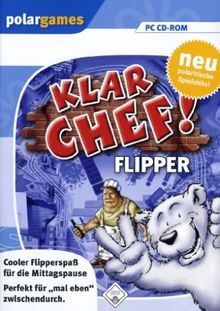
Screenshots 1
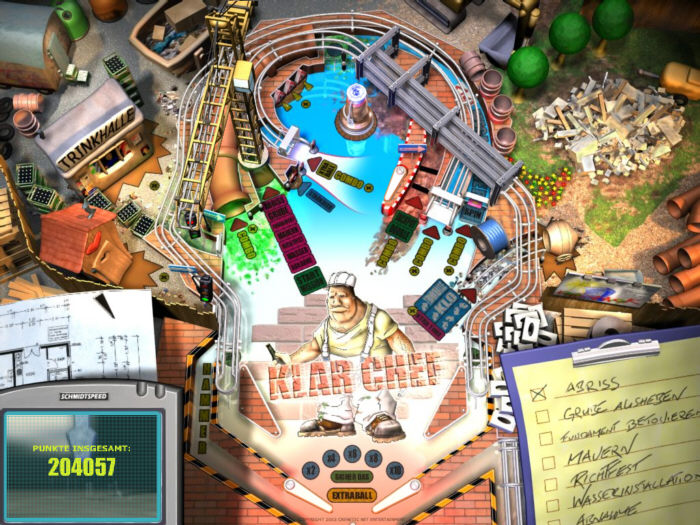
Ratings

 5/9
1 = could be built as a real machine · 9 = impossible in the physical world
5/9
1 = could be built as a real machine · 9 = impossible in the physical world
Videos
Gameplay Videos 1
Tips, Cheats, and Secrets
Klar Chef! - Installation Instructions
========================================
"Klar Chef!" means "Okay, boss!" in German.
These instructions are for running the German game "Klar Chef!" on modern 64-bit Windows.
IMPORTANT:
- Klar Chef includes the required Macromedia Flash 7.0.14.0 component.
- You do NOT need to install modern Adobe Flash Player.
- Windows XP (Service Pack 3) compatibility mode is REQUIRED for sound.
- Do NOT use Windows 95/98 compatibility mode.
1. INSTALL KLAR CHEF
--------------------
Run the Klar Chef installer.
The installer is in German. Here are the buttons to click:
SCREEN 1
"Willkommen zur Installation von 'Klar Chef'"
Buttons:
- Weiter = Next
- Abbrechen = Cancel
CLICK: Weiter
SCREEN 2
The installer asks where Klar Chef should be installed.
Default location:
C:Program Files (x86)Klar Chef
Buttons:
- Durchsuchen = Browse
- Abbrechen = Cancel
- Weiter = Next
Leave the default location and:
CLICK: Weiter
SCREEN 3
The installer may say:
"Es wurde kein Macromedia-Flash-Plugin gefunden.
Diese Anwendung benötigt aber Version 7.0.14.0.
Soll diese Version jetzt installiert werden?"
Translation:
"No Macromedia Flash plugin was found.
This application requires version 7.0.14.0.
Should this version be installed now?"
Buttons:
- Ja = Yes
- Nein = No
CLICK: Ja
SCREEN 4
The installer may ask:
"Soll eine Verknüpfung auf dem Desktop zu 'Klar Chef'
angelegt werden?"
Translation:
"Should a shortcut to 'Klar Chef' be created on the desktop?"
Buttons:
- Ja = Yes
- Nein = No
CLICK: Ja (optional)
SCREEN 5
The installation is complete.
There may be a checkbox to display the ReadMe file.
Button:
- Schließen = Close
CLICK: Schließen
2. INSTALL THE INCLUDED FLASH COMPONENT
---------------------------------------
Open Command Prompt as Administrator.
To do this:
- Open the Start menu.
- Type: cmd
- Right-click "Command Prompt".
- Select "Run as administrator".
Run these commands ONE AT A TIME:
mkdir C:WindowsSysWOW64MacromedFlash
copy "C:Program Files (x86)Klar Chefflash.ocx" "C:WindowsSysWOW64MacromedFlashflash.ocx"
C:WindowsSysWOW64regsvr32.exe "C:WindowsSysWOW64MacromedFlashflash.ocx"
3. VERIFY FLASH REGISTRATION
----------------------------
After the last command, you should see:
"DllRegisterServer in C:WindowsSysWOW64MacromedFlashflash.ocx succeeded."
Click OK.
4. SET WINDOWS XP COMPATIBILITY MODE
------------------------------------
THIS STEP IS REQUIRED FOR SOUND TO WORK.
Find:
C:Program Files (x86)Klar Chefcrenetic.exe
Right-click "crenetic.exe" and select:
Properties
Then click the:
Compatibility
tab.
Check:
"Run this program in compatibility mode for:"
Select:
Windows XP (Service Pack 3)
Also check:
"Run this program as an administrator"
Click:
Apply
Then:
OK
IMPORTANT:
Use Windows XP (Service Pack 3).
Do NOT select Windows 95 or Windows 98 compatibility mode.
5. RUN KLAR CHEF
----------------
Launch Klar Chef from the desktop shortcut.
If necessary, run:
C:Program Files (x86)Klar Chefcrenetic.exe
The game should now have both graphics AND sound.
6. CONTROLS
-----------
Schläger links: Y
Left flipper: Y
Schläger rechts: M
Right flipper: M
Stoß Mitte: Space
Center nudge / bump: Space
Stoß links: X
Nudge left: X
Stoß rechts: N
Nudge right: N
Starte Kugel: S
Launch ball: S
Pause: P
Pause: P
Menü
Menu
NOTES
-----
- Windows XP (Service Pack 3) compatibility mode is REQUIRED for sound.
- Do NOT use Windows 95/98 compatibility mode.
- Do NOT install a separate modern Flash Player.
- Klar Chef uses its included Flash 7.0.14.0 ActiveX component.
- These instructions are for 64-bit Windows.
- The Command Prompt steps require Administrator privileges.
Details
Suggest a correction
Tables / Floors
No tables recorded for this game.